Junior sport feedback, for parents and coaches.Help young players see what to work on.
Film a young player’s batting, kicking, shooting or running from your own Observe account. Observe’s AI gives clear, encouraging feedback you can go through together, and lets you re-observe to see their progress.
Try it Now →
How families and coaches use Observe
Between training sessions
Coaches only have so much time per player. A short clip at home gives young players something specific to practise before next week.
Seeing progress
Re-observe the same skill over weeks and compare. Young players can see for themselves that practice is working, which keeps them motivated.
Any sport
Cricket, soccer, basketball, netball, athletics, swimming technique and more. If it can be filmed, Observe can give feedback on it.
Clear, simple language
Feedback comes as strengths, things to work on and tips. That makes it easy to talk through with a young player.
How Observe helps
Video it
Record a short clip of yourself on your phone. Ten to fifteen seconds is enough.
Get feedback
Observe's AI gives you clear, specific feedback. Ask a question about your Observation and get a visual fix to work on.
See yourself improve
Re-observe over time to compare your clips and see how your technique is changing.
How to film it
- A parent, guardian or authorised coach films the clip and submits it from their own adult account.
- Film side-on and from a few metres away so the whole movement is in frame.
- Keep the phone steady and film two or three repetitions of the same skill.
- Only film and upload young players when you have the right and any permission needed, especially in a club or school setting.
See an example report
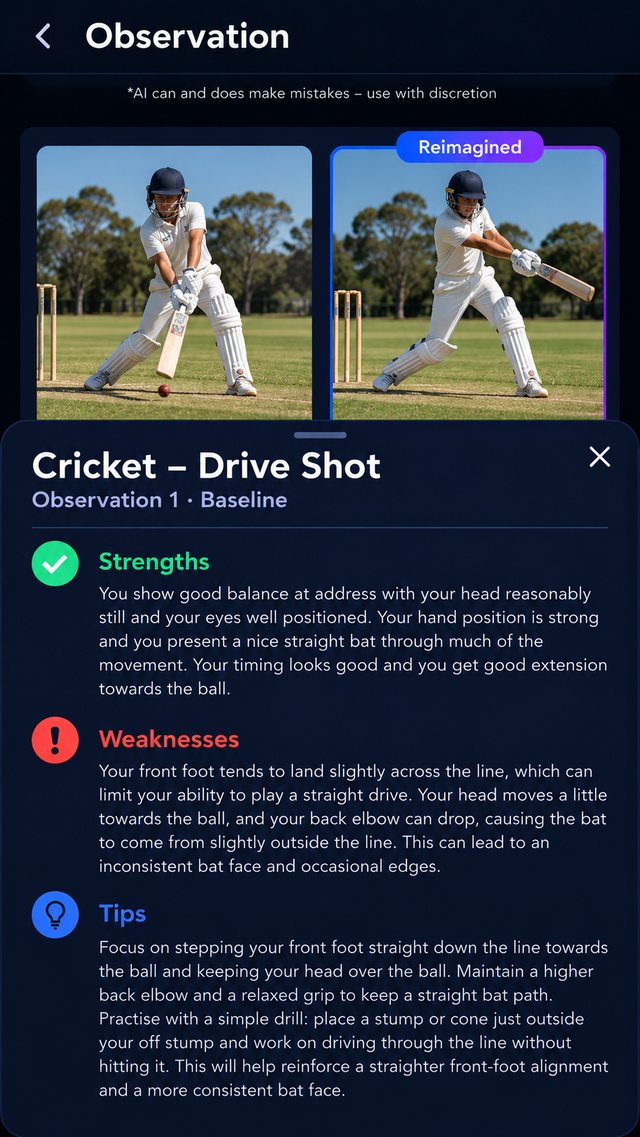
See exactly what Observe sends back: strengths, things to work on and tips, from an example cricket drive shot report.
Read the cricket example →Questions
Can my child have their own Observe account?
People under 15 cannot hold their own account. A parent, guardian or authorised coach submits the young player’s clip from their own adult account. People aged 15–17 can hold their own account, with extra youth privacy and safety settings.
Are videos of young players kept private?
Yes. Videos are private by default and are not published or shown to other Observe users. Any report you share should stay within the permission you have.
Can a club or coach use Observe for their players?
Yes. An authorised adult can submit players’ performances for coaching, as long as they have the permissions required and follow their club or school’s safeguarding policies.
Observe provides AI-generated guidance to support your practice. It is not a substitute for a qualified coach, trainer or health professional.